Understanding Legal Databases
Sources, Usage and Best Practices
Last updated 6 months ago
Whisperit gives you direct access to Swiss legal databases, allowing the AI to search real legal sources rather than relying solely on its internal knowledge. This significantly improves the accuracy and reliability of legal answers.
Available Databases
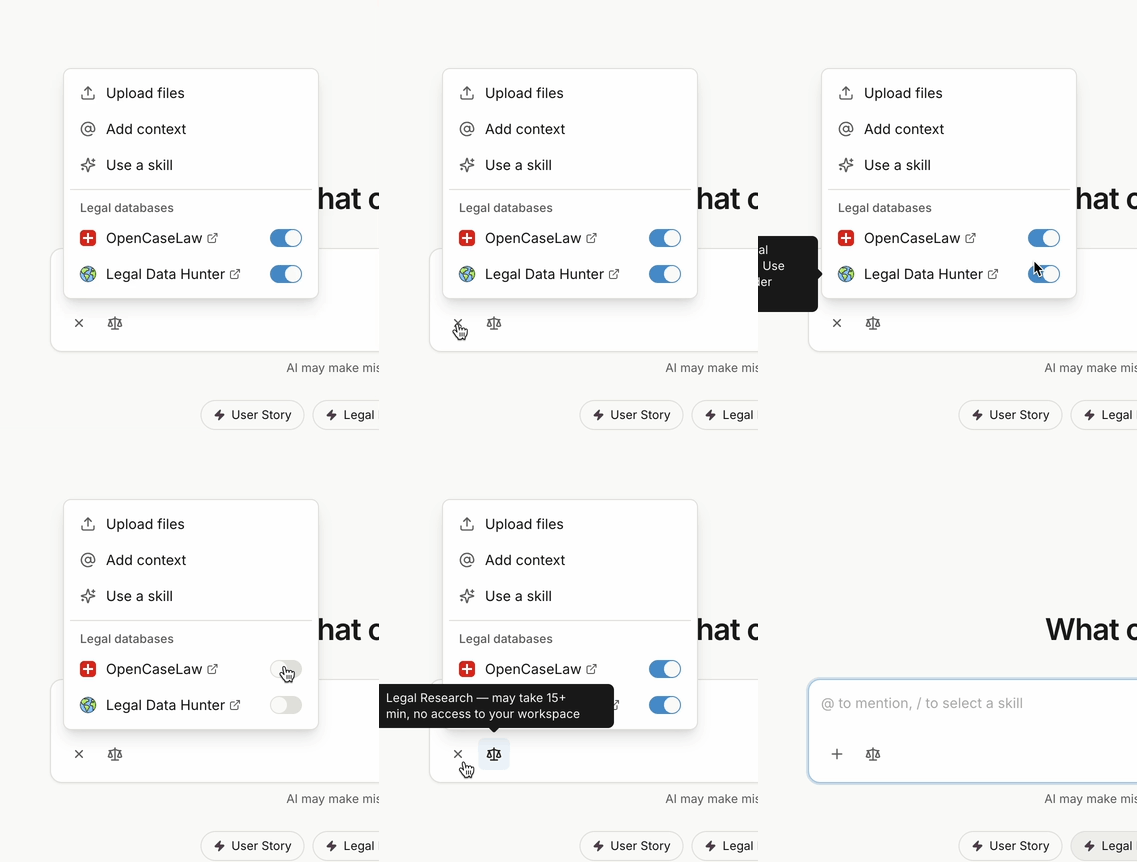
Whisperit currently integrates two legal databases:
OpenCaseLaw — a Swiss legal database containing cantonal and federal case law.
Legal Data Hunter — an additional legal research tool to complement your searches.
Enabled by Default
In Whisperit V3, both databases are enabled by default for every conversation. You do not need to take any action to activate them — they are ready to use from the moment you start a conversation.
How the AI Uses Them
The assistant is designed to know when to consult these databases based on the nature of your request. For legal questions, it will typically search the relevant sources on its own.
You can also explicitly instruct the assistant to use them, for example:
"Check Swiss laws"
"Use your search tools"
"Verify using your available sources"
"Use OpenCaseLaw"
This is particularly useful when you want to make sure the answer is grounded in actual case law or legislation rather than general knowledge.
Legal Databases vs. Legal Research
It is important to distinguish between legal databases and the Legal Research feature. Legal databases (OpenCaseLaw and Legal Data Hunter) are sources that the AI consults to ground its answers in real case law. Legal Research is a separate, dedicated feature that performs a deeper and more structured analysis — think of it as a more thorough investigation that takes longer but goes further in depth.
For quick, precise answers grounded in Swiss law, enabling the legal databases is often faster. For comprehensive research on a legal topic, the Legal Research feature may be more appropriate.
Disabling the Databases
If you are working on a task that does not require legal database access — such as drafting a letter or summarising a document — you can disable the databases on demand directly from the interface using the toggle buttons.
Tips for Best Results
For precise legal questions, explicitly mention the source you want the AI to use.
If the AI's answer seems uncertain, ask it to verify using its available sources.
Use the Legal Research feature for in-depth analysis on complex legal topics.
Disable the databases only when your task does not require legal research.
Was this helpful?
Still need help? Ask the team